DICE Access
- 1.0
- Rating
- 10.00K
- Installs
- Free
- Price

 Analysis by App-foxy
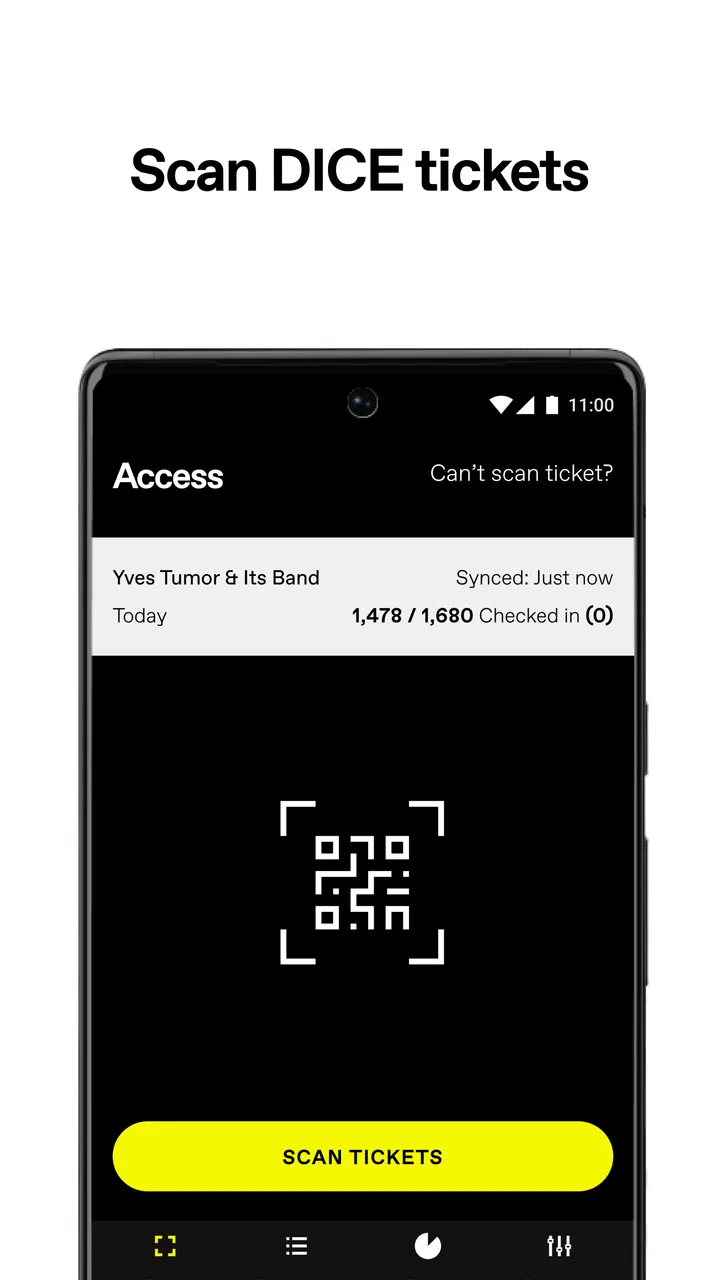
If you work at a venue that hosts events sold through DICE, DICE Access is designed for one focused job: checking tickets at the door. I found it much more straightforward than a general event-management app because it does not try to become a ticket marketplace, a planning tool, or a customer-facing discovery service. Its purpose is operational, and that narrow purpose is also the key to understanding whether it belongs on your phone.
The app is free to install and is aimed at venues rather than concertgoers. It comes from DICE FM, sits in the events category, and carries an Everyone age rating. The current release is version 8.7, while the app can run on Android devices using Android 5.0 or later. Those details make it accessible to a wide range of venue phones, including older spare devices that may still be useful on an entrance desk.
What to expect when using DICE Access
The first thing I would tell a new user is not to expect the same experience as the regular DICE app used by people looking for shows and buying tickets. DICE Access is the venue-side tool. Its role begins after tickets have been sold, when staff need to validate them quickly as guests arrive.
You May Also Like

 Blood Strike: 2.5 Anniversary
Blood Strike’s Loadouts Turn Every Drop Into a Tactical Gamble
A close look at Blood Strike’s custom loadouts: how fast access to signature weapons reshapes its battle royale rhythm, rewards preparation, and narrows the gap between fights.

 Pandora - Music & Podcasts
Pandora’s Music Is Easy to Start, but Harder to Recover
Pandora’s strength is its low-effort path from a seed to a station. Its weak spot is how much confidence it asks you to place in connection, setup, and quiet recovery.

 8 Ball Pool
 Is Built on Rivalries, Rematches, and Routine
A close look at the rivalries, rematches, shared routines, and unanswered safety questions that turn a quick pool match into a persistent mobile community.

 Samsung Music
’s Quiet Strength Is Playing What You Already Own
Its reach comes less from spectacle than from dependable access to a personal library. That simplicity is both the app’s strongest retention engine and its ceiling.

 AccuWeather: Weather Radar
AccuWeather Review: A Quick, Clear Forecast for Everyday Decisions
For everyday plans, the best forecast is the one you can understand quickly. AccuWeather makes rain timing, radar, and local conditions easy to act on, with a few trade-offs.

 Hill Climb Racing
Why Hill Climb Racing Still Turns Crashes Into One More Run
A tiny car, a bumpy hill and one more upgrade: Hill Climb Racing keeps resurfacing because its simple chaos makes every near-miss feel personal.
More From Our News Desk



That distinction matters because a ticket scanner has a very different job from an event listing app. At the door, staff need a clear action, a quick response, and enough confidence to know whether the guest can proceed. Extra browsing features would be a distraction in that setting. DICE Access makes more sense when viewed as one part of an entrance workflow rather than as a complete event platform.
In an everyday scenario, imagine a small venue preparing for an evening show. One staff member stands near the entrance with a phone, opens the access tool, and checks each DICE ticket as guests arrive. Another person can focus on answering questions or managing the queue. The value is not entertainment; it is reducing the amount of manual checking required at the busiest point of the night.
That narrow focus is a strength for a trained door team, but it also creates a clear limitation. If you are simply attending an event, buying tickets, or searching for something to do, this is not the app you need. A customer-facing ticket app is the better choice for those tasks. DICE Access is for the people responsible for admitting ticket holders.
The app has a modest public footprint, with over ten thousand installs, an average rating of 1.0 from around seventy ratings, and four written reviews. I would not treat that rating alone as a complete judgement of its usefulness, because staff tools are often used in specific venue workflows and reviewed less consistently than consumer apps. Still, it is a sensible reminder to test the app with your team before relying on it during a crowded entrance.
Who will get the most from it
DICE Access is best suited to venues, promoters, and door staff whose events use DICE tickets. It can be useful for a small team that wants a dedicated phone-based way to handle admission instead of maintaining a separate paper list or asking staff to inspect every ticket manually.
It is also a reasonable fit when your venue needs a simple handoff between ticket sales and entry control. The person selling or managing the event does not have to turn the entrance phone into a general-purpose administrative workstation. Staff can concentrate on the physical act of checking tickets and moving the line forward.
I would be more cautious if your venue sells tickets through several unrelated services. In that situation, DICE Access may cover only one part of the door operation, so staff could still need another process for guests using a different ticket provider. The app is most coherent when DICE is the ticketing system your event already relies on.
Getting ready for the first use
Before the first event, I would install the app on the actual device intended for the entrance rather than assuming every phone will be equally convenient. A larger screen may make the checking process easier to read, while an older device can be perfectly adequate if it meets the Android requirement and remains comfortable for repeated use.
I would also decide who is responsible for the phone. This sounds minor, but entrance problems often come from unclear ownership rather than from the scanning action itself. One person should know where the device is, who prepares it before doors open, and who takes over if the first staff member needs a break.
Do a quiet rehearsal before guests arrive. Use the device in the same position and with the same staff member who will work the door. The goal is not to create a complicated training session; it is to remove hesitation. Staff should know where to begin, what a successful check looks like, and when to pause and ask a supervisor instead of making a guess.
A useful preparation habit is to keep the entrance phone dedicated to the event task during the busiest period. Avoid switching between unrelated apps while a queue is forming. Even when the checking action itself is simple, every extra interruption can make staff lose their place or create uncertainty about whether a ticket has already been handled.
Because the app is free, the financial barrier to trying it is low. That does not mean the operational cost is zero. A venue still spends time training people, preparing devices, and deciding how to deal with guests whose tickets need attention. Treat that preparation as part of adopting the tool, not as an optional extra.
Reaching the first successful action
For a first-time user, success should mean completing one ticket check calmly and understanding the result. Do not begin by trying to process an entire crowd. Start with a small rehearsal involving the person responsible for the event and the person operating the phone.
Once the app is open and ready for the venue workflow, have the operator follow the on-screen process with a ticket that is appropriate for testing. Watch the operator’s hand position, the phone angle, and the time it takes to interpret the response. This reveals practical issues that a written instruction cannot: a bright entrance, a reflective screen, a cramped doorway, or a staff member who is standing too far from the guest.
After the first successful check, repeat the action several times without changing the basic setup. Repetition helps staff learn the rhythm of admitting people while keeping their attention on the guest. A good entrance routine should feel deliberate but not slow. The phone is there to support the conversation at the door, not replace it.
One non-obvious benefit of this rehearsal is that it separates app confusion from event-policy confusion. If a guest asks whether a ticket can be used in a particular situation, that may be a venue decision rather than a scanning issue. Staff should know which questions the app can answer through the ticket check and which questions must go to the event lead.
I would also establish a simple verbal routine for the team. For example, the operator can confirm that the check has been completed while another staff member directs the guest onward. This avoids two people handling the same guest at once and makes it less likely that an unclear result will be ignored because the queue is moving.
Common points of confusion at the door
The biggest mistake is assuming that every difficult admission is an app failure. A ticket may need attention for reasons connected to the event, the guest, or the ticket itself. When that happens, the operator should avoid promising entry or rejection immediately unless the venue’s procedure is clear.
Another common problem is rushing through an unclear result. At a quiet desk, staff can take a moment to read what the app is showing. In a queue, pressure encourages people to tap again, hand the phone to someone else, or wave the guest through. I think the safer habit is to pause, keep the guest informed, and involve the designated supervisor when the result is not obvious.
Teams can also become confused about roles. DICE Access checks DICE tickets, but it is not a substitute for a door manager who understands guest lists, accessibility arrangements, age policies, or event-specific instructions. The app can support admission control without becoming the source of every decision made at the entrance.
There is a practical trade-off between speed and consistency. A very fast operator may process a line quickly but give new staff no chance to learn. A slower operator may be more careful but create a queue. The best approach is to train before the doors open, then use the simplest repeatable motion during the rush.
If your team uses more than one ticketing service, make the separation obvious. Keep the DICE workflow distinct from any other admission method, and explain to staff which guests should be directed to which process. Mixing systems at one desk is a realistic source of delay, especially when a guest presents a ticket that looks familiar but belongs to another platform.
Older Android support is helpful for venues with existing hardware, but compatibility alone does not guarantee a comfortable shift. Test the phone’s screen, battery condition, and handling before assigning it to the door. A device that technically runs the app but is awkward to use can slow every interaction.
How it compares with usual alternatives
The usual alternatives are manual ticket inspection, printed guest lists, or a broader ticketing system that includes admission tools alongside sales and event administration. Manual checking can work for a very small gathering, especially when the guest list is short and the entrance is relaxed. It becomes less attractive when the venue expects a steady flow of DICE ticket holders.
Printed lists are familiar and easy to understand, but they can require staff to search, interpret names, and handle changes manually. A dedicated digital access tool is more natural when the original tickets are already managed through DICE. The trade-off is that staff must be comfortable with the phone-based process and have a clear plan for unusual cases.
A full event-management platform may be a better choice for organizers who need scheduling, sales reporting, guest-list administration, or support for several ticket providers in one place. DICE Access is more focused. I prefer that focus at a DICE-only entrance, but I would not choose it as the sole operational system for a complex festival or a venue with many unrelated admission channels.
There is also a human difference between digital checking and a paper list. With paper, staff can sometimes annotate a situation in the margin or consult a supervisor without changing devices. With DICE Access, the operator’s attention is centered on the phone. That can be efficient, but the team should preserve a human escalation path for anything the access check does not settle.
Practical habits that make the workflow smoother
First, assign a backup operator before the event begins. This is more useful than waiting until the primary operator needs help. The backup should repeat the first successful action during rehearsal, so switching roles does not introduce a new learning curve while guests are waiting.
Second, keep the phone’s position consistent. Guests quickly learn where to present their ticket, and staff develop a repeatable motion. Constantly changing the angle or passing the phone across the desk makes the process feel less certain and can increase handling time.
Third, separate technical uncertainty from guest communication. If a result needs a second look, tell the guest that the team is checking it rather than silently staring at the screen. This small habit reduces tension and gives the supervisor time to make a decision without turning the queue into an argument.
Fourth, use a short pre-opening check. Confirm that the correct event workflow is ready, that the assigned operator can complete a ticket check, and that the team knows who handles exceptions. This is not glamorous, but it is where a large part of the app’s real value comes from: a simple tool works best inside a simple, agreed routine.
Finally, review the entrance process after the event. Ask where staff hesitated, which guest questions were repeated, and whether the phone position helped or hindered the flow. The answers can improve the next shift without requiring a different app. In my experience, these small operational adjustments matter as much as the installation itself.
My recommendation for a first-time venue user
I would recommend DICE Access to a venue that already uses DICE for its tickets and wants a focused way to handle admission. The free price makes a trial practical, and the support for older Android versions can help teams use available hardware instead of immediately buying dedicated devices.
I would not recommend treating it as a universal ticketing solution. It is not the right fit for a customer looking for events, an organizer who needs a complete event back office, or a venue that must combine several ticketing services without a separate procedure. Those users should choose a broader or customer-facing alternative that matches their main task.
The most reassuring path is to start small: install it on the intended entrance phone, rehearse one ticket check, repeat the action until the operator is comfortable, and agree on how unclear cases are escalated. That process answers the questions a first-time user usually has—whether the phone is suitable, whether staff can learn it quickly, and whether it fits the venue’s admission routine—without discovering the answers in front of a queue.
My final view is that DICE Access is valuable precisely because it stays close to the door. It is not a flashy app, and its public rating suggests that prospective users should test it thoughtfully rather than assume it will solve every event problem. For the right venue, though, a dedicated ticket-checking tool can remove unnecessary manual work and give staff a clearer rhythm during entry. Use it as the DICE ticket checkpoint, not as a replacement for venue judgement, and its focused design makes the most sense.
FAQs for DICE Access
01What is DICE Access and what can I use it for?
DICE Access is a ticketing and event-discovery app designed to help users find concerts, club nights, festivals, and other live events. After creating an account, you can browse available events, check dates and venues, purchase tickets when sales are open, and manage your bookings from one place. Availability and features may vary depending on your location and the event organizer.
02Do I need an account to buy tickets through DICE Access?
In most cases, you need to create or sign in to a DICE account before completing a ticket purchase. Registration allows the app to associate tickets with your identity and helps protect them from unauthorized transfers or duplication. You may also be asked to verify your email address or phone number, so it is important to provide contact details that you can access.
03How do tickets work after I purchase them in the app?
Purchased tickets are generally stored digitally in your DICE account and can be accessed from the app before the event. At the venue, you may need to display the in-app ticket or QR code for scanning. Some tickets can be transferred through the official app, while others may be restricted by the organizer. Screenshots may not be accepted, so check the ticket instructions carefully.
04Can I get a refund or transfer a DICE Access ticket?
Refund and transfer options depend on the event’s terms, the organizer’s policy, and sometimes local consumer regulations. Many tickets are non-refundable unless an event is canceled, postponed, or the organizer approves an exception. If official resale or transfer is available, it should normally be handled through the app rather than an unofficial marketplace. Review the event conditions before purchasing.
05Is DICE Access safe to download and use?
DICE Access is intended to provide an official way to discover events and manage digital tickets, which can reduce the risk of buying counterfeit tickets from unknown sellers. For safety, download the app only from the official Google Play Store or Apple App Store, keep it updated, and use a strong password. Always verify the event details, fees, venue information, and entry requirements before paying.
Pros
- Fast access to tickets
- event details
- and venue information in one place.
- Useful notifications help you keep track of upcoming shows and ticket updates.
- Supports mobile ticketing
- reducing the need to carry printed tickets.
- Clean interface makes browsing participating events relatively straightforward.
- Can simplify entry at venues that accept DICE’s digital ticket system.
Cons
- Only works with events and venues that use the DICE ticketing platform.
- Ticket availability and prices vary widely by location and event popularity.
- Account or identity checks may be required before accessing certain tickets.
- Digital-only entry can be inconvenient if your phone battery or connection fails.
- Resale and transfer options may be restricted by the event organizer.

DICE Access
Gallery